
For AI
View the auction report
See what your auction raised, where the fees went, and who won, then download it as CSV or PDF
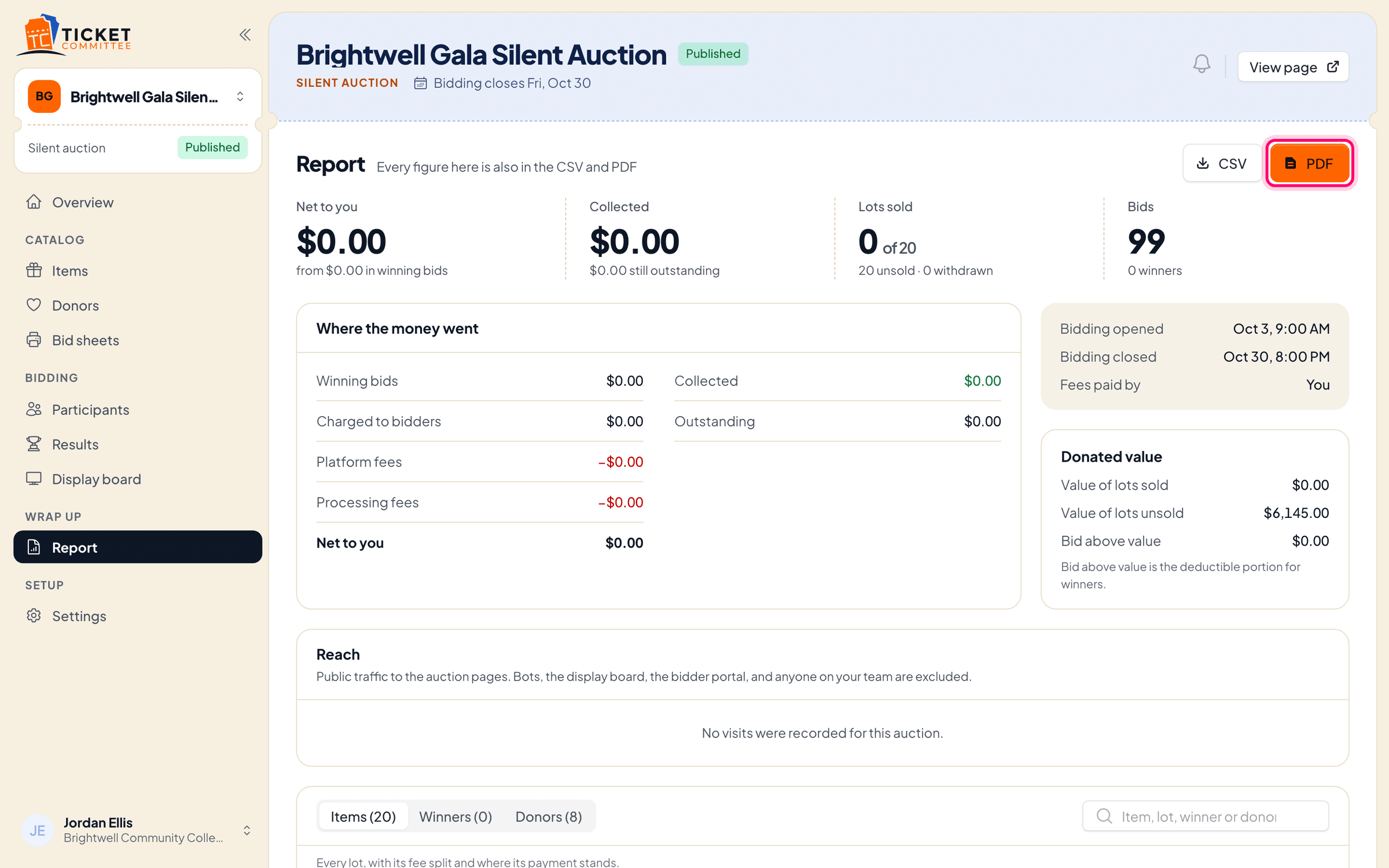
The Report is your end-of-auction summary. It shows what you raised after fees, what’s still outstanding, how each lot did, and totals for every winner and donor. Use it for your books, your board, and thank-you letters.
Only people in your organization can see the report. Campaign volunteers can’t, because it includes winner contact details and fees.
Open the report
Section titled “Open the report”Open your auction and go to Report (under Wrap up in the sidebar).
To save a copy, click CSV for a spreadsheet or PDF for a printable version. Every figure on the page is also in both downloads.
The headline numbers
Section titled “The headline numbers”| Figure | What it means |
|---|---|
| Net to you | What your organization keeps after platform and processing fees, out of the total winning bids. |
| Collected | Money actually charged so far, with the amount still outstanding below it. |
| Lots sold | Sold lots out of those offered, plus how many were unsold or withdrawn. |
| Bids | Total bids placed, and how many different winners there were. |
Where the money went
Section titled “Where the money went”This section breaks your total down:
- Winning bids: the sum of every winning bid
- Charged to bidders: what winners actually paid. This is higher than the winning bids if you pass fees to bidders.
- Platform fees and Processing fees: what was taken out
- Net to you
It also shows Collected and Outstanding, and how many lots are in each payment status.
Beside it you’ll find when Bidding opened and Bidding closed, and who the Fees paid by were (Bidders or You).
Donated value
Section titled “Donated value”If you entered a Value on your items, this section shows:
- Value of lots sold and Value of lots unsold
- Bid above value: how much winners paid over each item’s value. This is the deductible portion for winners. Items with no value entered count as zero here.
Reach shows how many people looked at your auction: Page views, Visits, Lot page views, and Winning bidders. Most viewed lots lists each lot’s views, visits, bids, and winning bid. A lot with lots of views but no bids is one people looked at and passed on.
Only public traffic counts. Bots, the display board, the bidders’ My bids pages, and your own team are left out. Visits only counts browsing sessions that accepted analytics cookies.
Detail tables
Section titled “Detail tables”At the bottom, switch between three tables. Each one is searchable.
- Items: every lot, with its winner, value, winning bid, amount charged, fee split, net, and payment status.
- Winners: one row per bidder, with their items, total bids, amount charged, collected, outstanding, and deductible amount. Good for acknowledgment letters and following up on balances.
- Donors: what each donor gave, how many of their lots sold, the stated value, and what their lots raised. A lot from several donors counts in full for each one, so these rows don’t add up to the auction total.