
For AI
Ask attendees to sign the waiver
Send signing links by email or text after people buy, and remind anyone who hasn't signed
Once your event has a waiver, you can send each attendee their own signing link after they buy a ticket. You can also remind everyone who hasn’t signed yet.
Send signing links when people register
Section titled “Send signing links when people register”- Open your event and go to Setup → Waivers, then click your waiver.
- Click Settings, then Notifications.
- Turn on Ask attendees to sign when they register.
- Choose how to send it: Email, Text message, or both.
- Under Where to find their contact details, tick the registration questions that ask for an email or phone number. They’re grouped by ticket type.
- Write the message:
- Email: enter a Subject and Message. Turn on Send from a no-reply address, or turn it off and enter where Replies go to.
- Text message: enter a Message of up to 320 characters.
- Click Save.
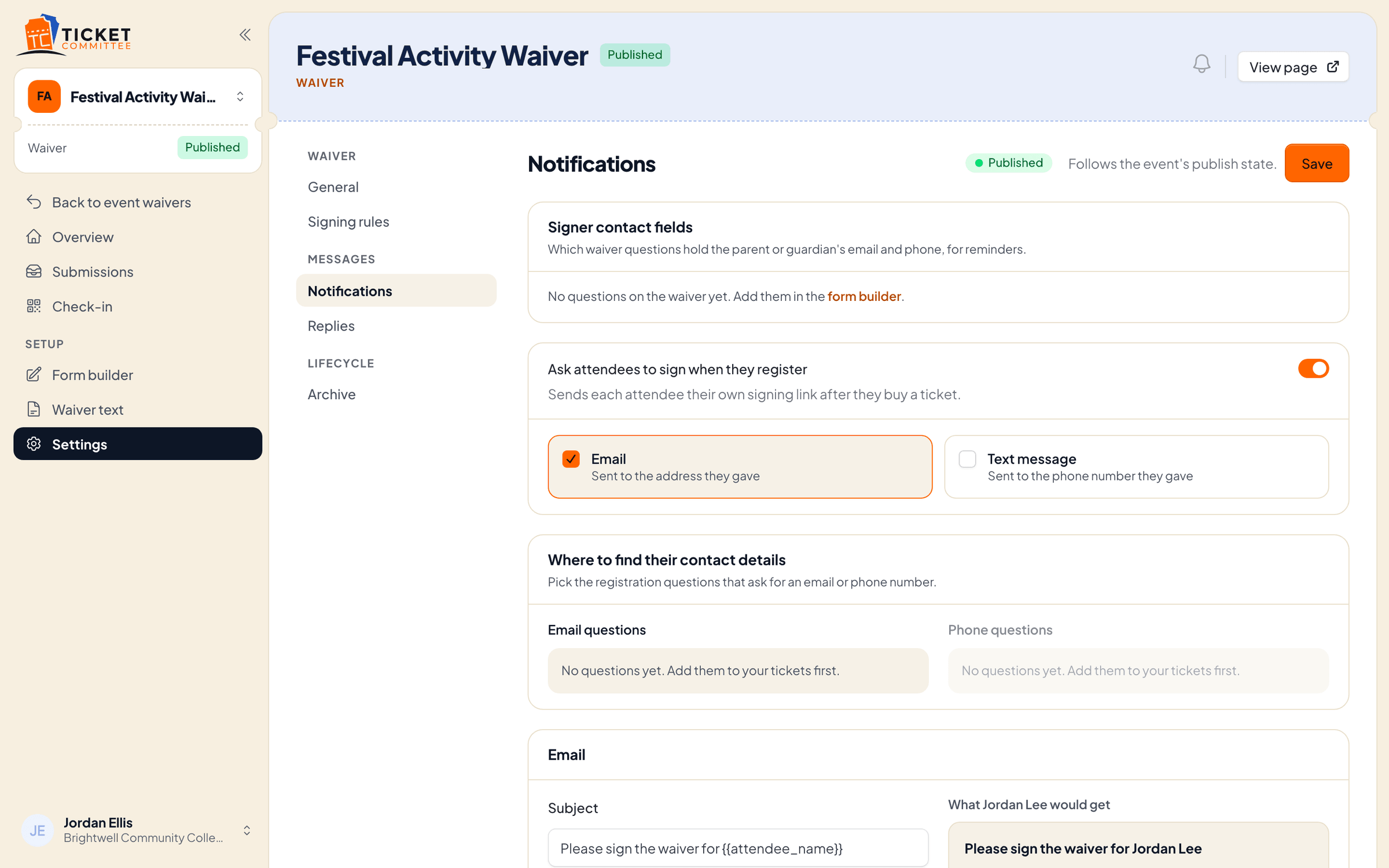
As you type, the preview shows what an attendee would get, with the placeholders filled in. Use {{attendee_name}}, {{event_name}}, and {{waiver_link}} in both. Emails can also use {{waiver_name}}.
Attendees also get a shareable signing link on the waiver’s Overview page. Use Copy link, or print the QR code on a flyer or post it at the door.
Order confirmation message
Section titled “Order confirmation message”Under Order confirmation on the same page, set the Title and Message buyers see on their order confirmation page when this waiver is required.
Remind people who haven’t signed
Section titled “Remind people who haven’t signed”- Go to Setup → Waivers.
- Click the ⋯ menu next to your waiver.
- Choose Remind people who haven’t signed.
Reminders go to every attendee on an active order who hasn’t signed yet, using the message and channels from Notifications.
The Waivers page also shows how many attendees have Signed, how many are Still to sign, and the total Attendees, so you can see who’s left at a glance.
Message just the people who haven’t signed
Section titled “Message just the people who haven’t signed”For a custom nudge, go to Reach → Email & text and create a new message. Set the Waiver filter to Waiver missing, and add {waiver_link} to the message. See Send an email or text.