
For AI
Processing fees
What Stripe charges for card payments, and how to choose whether your organization or the buyer covers it
Every card payment has a processing fee charged by Stripe. You decide, event by event, whether your organization absorbs that fee, the buyer is asked to cover it, or it’s added to every order automatically.
What Stripe charges
Section titled “What Stripe charges”For U.S. dollar payments, Ticket Committee calculates Stripe’s fee as 2.9% + 30¢ per card charge. Stripe takes its fee from each payment before the money reaches your bank. Your Stripe dashboard shows the exact fee on every charge.
Cash, check, comp, and free orders have no processing fee.
Choose who covers the fee
Section titled “Choose who covers the fee”- Open your event and go to Settings → Payments.
- Find the Processing Fees card. (It appears once your Stripe account is connected and turned on for the event. See Connect your Stripe account.)
- Turn on one of the switches, or leave both off.
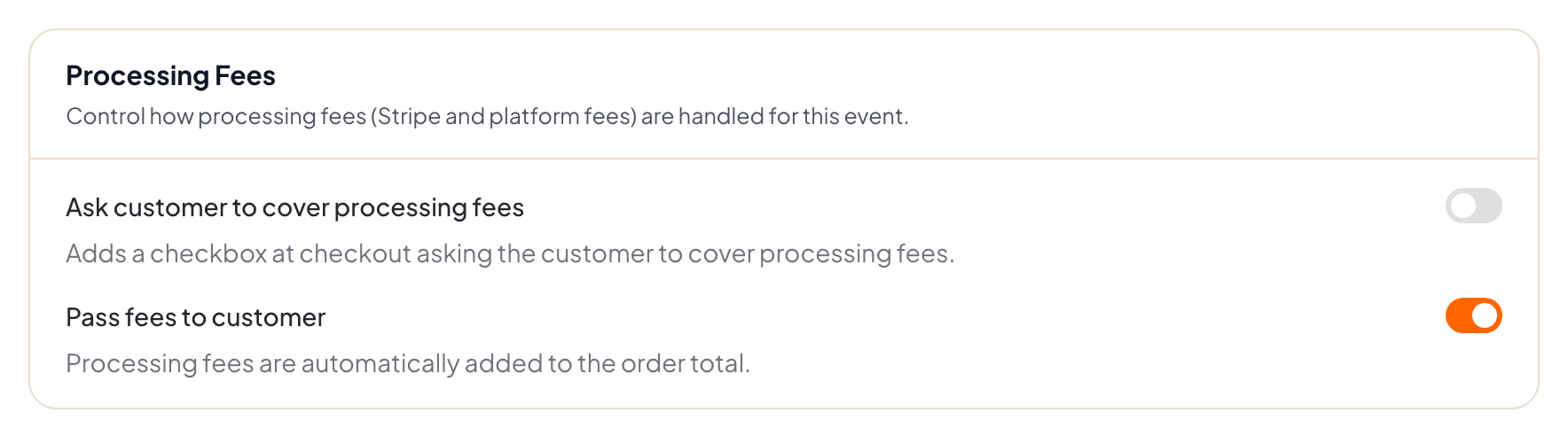
Changes save automatically. Only one switch can be on at a time: turning one on turns the other off.
| Setting | Switches | What the buyer sees |
|---|---|---|
| Organization absorbs | Both off | The ticket price, with no processing fee added. Stripe’s fee comes out of what you receive. |
| Ask the buyer | Ask customer to cover processing fees on | An unchecked box at checkout: “Cover the $X processing fee so (your organization) receives the full amount.” If they check it, the fee is added to their total. If not, you absorb it. |
| Pass to the buyer | Pass fees to customer on | A Processing fees line added to every card order, included in the total automatically. |
How the fee is calculated
Section titled “How the fee is calculated”When the buyer covers the fee, Ticket Committee adds just enough that, after Stripe takes its cut, you receive the full ticket amount.
For example, on a $20.00 ticket:
| Organization absorbs | Buyer covers | |
|---|---|---|
| Buyer pays | $20.00 | $20.91 |
| Stripe’s fee (about 2.9% + 30¢) | about $0.88 | about $0.91 |
| You receive | about $19.12 | $20.00 |
A few details:
- The fee is calculated on the order’s subtotal after any promo code discount, plus any donation the buyer adds.
- Buyers who choose to pay in person aren’t charged a processing fee, even when fees are passed on.
- The fee is shown to buyers before they pay, in the order summary and on their receipt.
Platform fees
Section titled “Platform fees”If your organization’s plan includes a Ticket Committee platform fee, a Platform Fees card appears on the same Settings → Payments page. It shows the current percentage or flat fee, with an example of what it adds to a $50 ticket. If you don’t see this card, no platform fee applies to your event.
When a platform fee applies, buyers see it inside the Processing fees line at checkout. Tapping the info icon next to it shows the split between Platform fee and Card processing. Your order details show the same breakdown under Tickets.
See what you’ve paid in fees
Section titled “See what you’ve paid in fees”Your event’s Analytics page shows estimated card fees, split into Buyer covered the fee and You covered the fee. See Track sales with Analytics. For exact amounts, use your Stripe dashboard.